Consolidate table
Contents
Getting started
Overview
Consolidate table is a module in the Table Tools utility of the Legal Productivity Suite for Microsoft Word by Craftware Solutions LLC. It condenses duplicate records (i.e., rows) based on a column you select which directs the application how to identify duplicates. When you process the workflow, a new table will be generated underneath with the content from the duplicate rows merged together by columns.
Sample document to assist with getting started (the download button is in the top right corner)
Use case
Consolidate table is ideal for combining duplicate table records in a Microsoft Word table. Using a key column (i.e., a unique identifier such as a social security number, employee id, driver's license number, passport number, stock-keeping unit (SKU), serial number, email address (sometimes), etc.), you can dedupe table content.
Combining duplicate table records
If you have a table or raw data export with duplicate records (e.g., multiple entries for the same employee, privilege log identifer, etc.), you can use this module to combine the content from the duplicate records into a single record. This is done by selecting a key column that contains the values used to identify the duplicate records. After processing, the content from the other columns will be consolidated into one cell (in their respective columns). A new table will be generated underneath with the combined content for the same records (as indicated by the key column values).
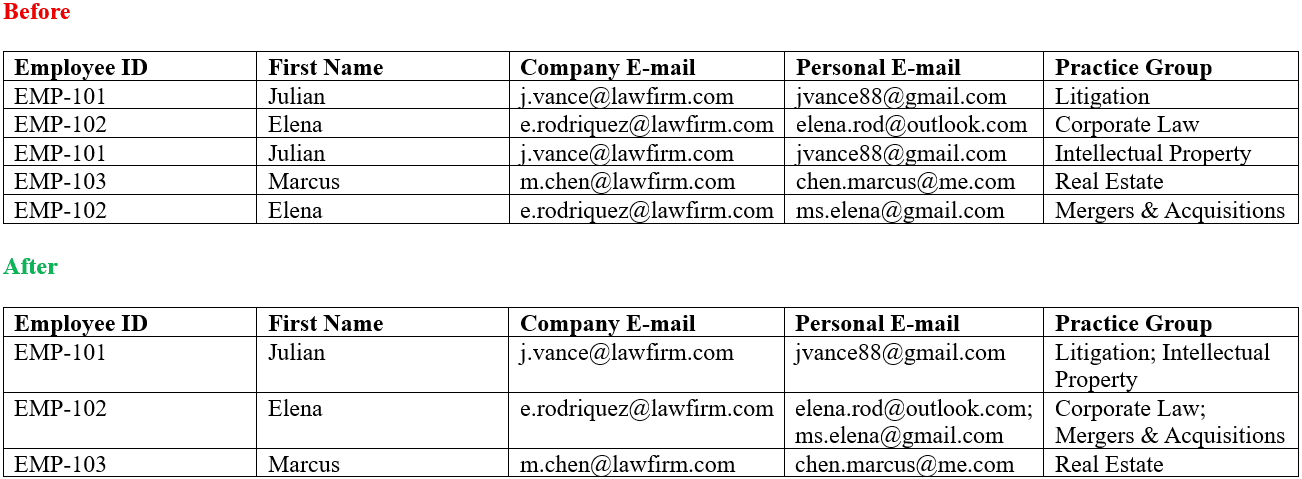 Using the Employee ID as the key column, personal e-mails and practice groups are consolidated for the duplicate employee records
Support
If you require support, please don't hesitate to contact us.
Column selection
Consolidates rows in a table based on values in a key column. The key column is the column in the table that contains the values used to group the content in the other columns. When you run the workflow after selecting the key column, a new table will be generated underneath with the content from the other columns consolidated based on the values in the key column.
Key column
Values from this column are the keys in key-value pairs. These keys serve as unique identifiers for the content in the other columns to be grouped by.
Workflow options
Provides options that will be taken into account during processing.
Omit blank keys
Specifies whether to omit cells without content from being stored as keys when collecting the key-value pairs.
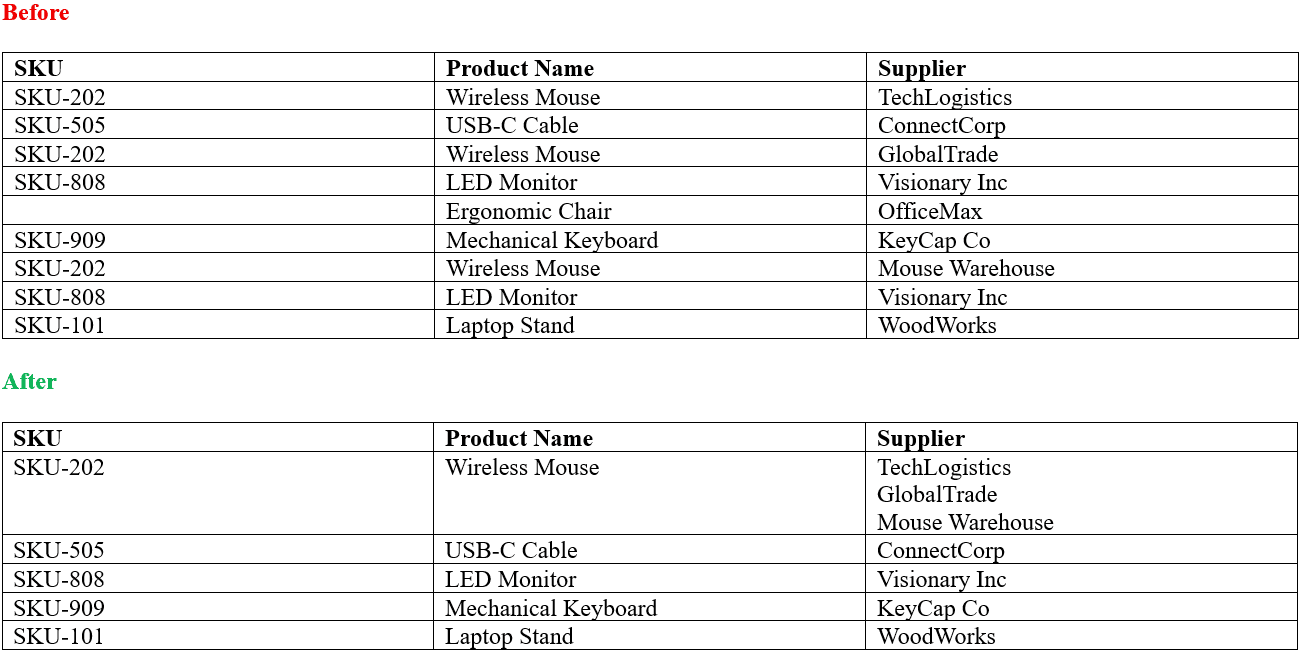 Example of a record with a blank key being omitted from consolidation since the key column, SKU, doesn't have content in the cell for the ergonomic chair.
Delimiter
Specifies the separator that will be used for merging content in non-key columns. When there are duplicate records, the content from the non-key columns will be merged into a single cell for each column. The delimiter you specify will be used to separate the merged content in the cell. For example, if you specify a semicolon as the delimiter, the merged content from the non-key columns will be separated by semicolons in the newly consolidated table.