Transcript cleanup
Contents
Getting started
Overview
Transcript cleanup is a module in the Toolkit utility of the Legal Productivity Suite for Microsoft Word by Craftware Solutions LLC. It combines content, by speaker, in transcripts where separate paragraphs may be created due to long pauses, topic shifts or transcription settings that detect speaker changes.
Use case
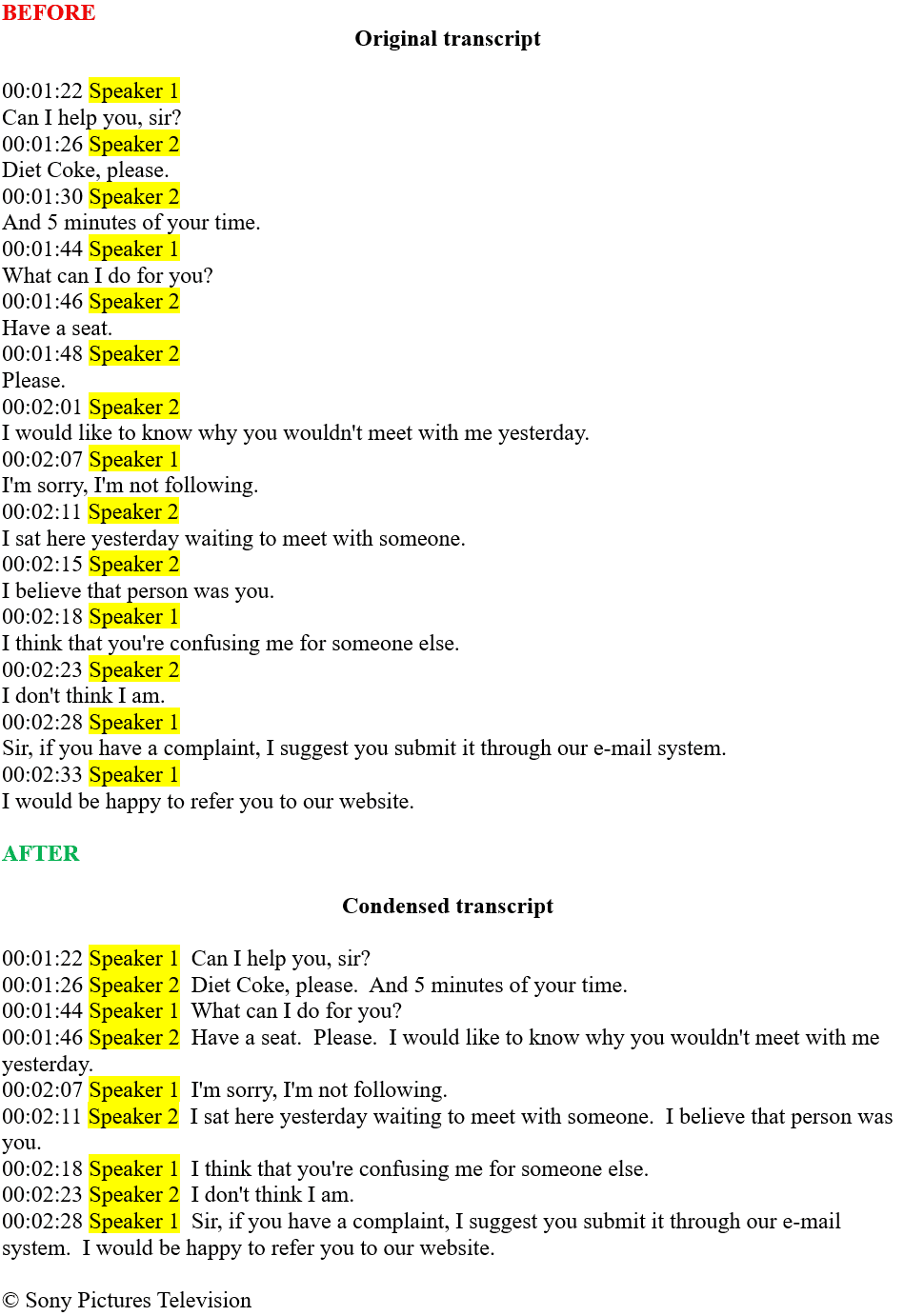
Merging paragraphs by speaker is time consuming and shifts focus during the essential task of verifying the accuracy of content. The transcript below was generated using the native transcription feature in Microsoft Word (Home tab > Down arrow under Dictate (Voice grouping) > Transcribe). As shown, transcribed content by the same speaker is combined after processing.
Support
If you require support, please don't hesitate to contact us.
Workflow options
Instructs the application how to combine transcript content when consecutive paragraphs are created for the same speaker.
Timestamp format
Specifies whether the transcribed content has timestamps. Selecting the format of timestamps in the transcript directs the application in properly detecting them.
Transcript does not have timestamps
Select this option if the transcript being processed does not have any timestamps
00:00 (minutes:seconds)
Select this option if the format of timestamps in the transcript use a minute and second format.
00:00:00 (hours:minutes:seconds)
Select this option if the format of timestamps in the transcript uses placeholders for hours, minutes and seconds. This format is the default for transcripts generated using Microsoft Word's native transcription module (Home tab > Down arrow under Dictate (Voice grouping) > Transcribe)
00:00:00.000 (H:M:S with milliseconds)
Select this option if the format of timestamps in the transcript includes milliseconds in an H:M:S format. Please note, the milliseconds are separated with a period and not a colon in this format.
Speaker identifier
Specifies the term used in the transcript to denote different speakers (Speaker 1, Speaker 2, etc.). Type your own if your transcript uses a different term or language.
Work product format
Specifies the output for the condensed work product.
Paragraphs
Returns the processed transcript as condensed paragraphs by speaker.
Table
Returns the processed transcript in a table where each speaker change begins a new row.
FAQs
Why was the selected transcript content combined into one paragraph after processing?
Transcript cleanup works by splitting the selected transcript content into three parts: (1) timestamps (if any), (2) speaker and (3) content. Selecting the correct workflow options instructs the application on how to identify these parts.
If a workflow option is selected that doesn't correspond to the transcript being processed (e.g., a timestamp format is selected when the transcript doesn't have timestamps, the wrong timestamp format is selected, etc.), then the module will fail to properly identify the necessary parts, and a combined paragraph will be returned. If you receive an undesirable result after processing, please review the selected workflow options and ensure they match your transcript.
I process transcripts regularly that utilize a timestamp format that's not listed as a timestamp format option. Can you add an additional format?
Absolutely! We love nothing more than hearing from you on how we can refine our offerings to provide the most value. Simply contact us, provide the desired format, and we'll update the selection list in this module.